Know who's on your Wi-Fi. Decide who stays.
Your front door has a lock, and you know who has a key. Your Wi-Fi deserves the same. NeonSpace draws everything connected to your home as a simple map, so you can see what belongs and spot what doesn't.
Not sure it's for you? Take the quiz that adapts to you →
What you get, before you download
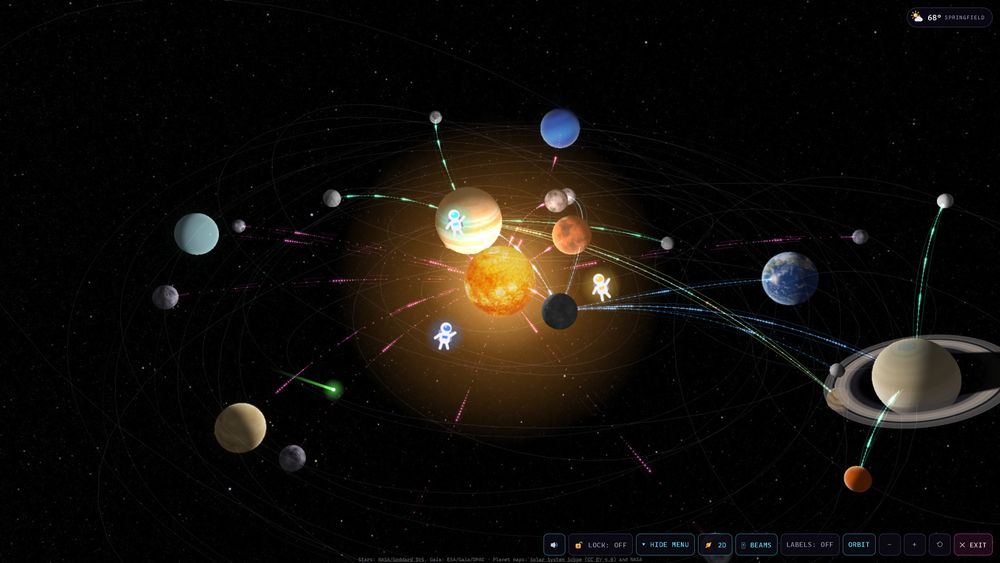
These are real screens from NeonSpace. The home in them is made up: its devices, people, weather and movie posters are invented, so you see the product without seeing anyone's house. Your own map fills in by itself with your own devices.
 See all 36 pictures →
Your home's details stay in your home.
Most smart-home apps send details about your house to a company's servers: when you're home, which devices you own, sometimes video. NeonSpace lives on your computer, so that information has nowhere to go.
Typical cloud apps
- Your home's details live on a company's servers
- Account required
- Stops working if the company shuts down
- You can't see what's collected
NeonSpace
- Runs in your house
- No account to make
- Keeps working when the internet is down
- Shows you what any AI would see before you ask it
It can't read your private things
It notices which devices answer on your network. It can't read your messages, your passwords or the websites you visit.
Your PIN guards the rest
Family can look at the map. Settings, cameras and anything that changes something stay behind a PIN that you choose.
Easy to walk away from
Change your mind and you can remove it in a minute. Your router and Wi-Fi settings will be exactly as you left them.
Nothing to hide
We publish what leaves your computer and why. Read the privacy policy or how we protect it.
You don't have to be a tech person to be in charge of your own home.
Moms and dads
See which screens are on, pause a tablet at bedtime, and give the kids a space game that can't touch your settings.
Teens and students
Finally learn how a network really works by flying around one in 3D. You might just become the person your family asks.
Couples and people on their own
Moved into a new place? Check what's already on the Wi-Fi, keep proof for when the internet is slow, and share a two-player game.
Grandparents and anyone who avoids tech
Plain words, no jargon. When something's wrong, you'll know what to say to whoever helps you fix it.
People with a side business
Know the moment your internet drops, and keep an eye on your sales from the same place you check on your home.
Network engineers
The people who already have every tool still get asked "is the Wi-Fi down?" This is the screen that answers for them.
Everything on one screen
NeonSpace only shows what you actually have. If something isn't in your home, it simply doesn't appear, so the screen stays simple.
The live map
Your router is the sun and every device is a planet. Tap one to see if it's online, name it, or make it a different planet, moon or spacecraft.
Drive health
Early warning signs for every hard drive, so you can save your photos before a drive fails.
Internet speed & historyPRO LITE
One-tap speed test and a week of charts. Handy proof when you call your internet provider.
Weather & tonight's sky
Local forecast with severe-weather warnings (US), the moon, Space Station flyovers and the space photo of the day.
Movies, if you use Plex or JellyfinPRO
What's playing on which TV, how hard your computer is working, and new arrivals for the kids. Titles are never stored.
TV mode & phone appPRO LITE
A beautiful full-screen solar system for the living room, and an app on your phone's home screen.
Your business, next to your homePRO
Connect Stripe or Shopify, add Amazon, Etsy or cash by hand, and see revenue, orders and subscribers on one screen. The numbers stay behind your PIN, and your keys stay on your computer.
Home servers, if you have one
Got a computer running movies, photos or anything else for the house? NeonSpace finds what it can and watches over it.
An AI that knows your homePRO LITE
Ask Juno why the TV is buffering and get simple steps, or use your own local AI for free. It can't change anything unless you say yes twice.
Good to know
Can I block someone using my Wi-Fi?
Yes, and you can undo it any time. Tap a device you don't recognize and NeonSpace walks you through it. You can stop its internet with the free AdGuard Home, or block it on your router using the steps it gives you. To remove everyone unknown at once, change your Wi-Fi password. If your router belongs to a landlord or building, ask them, since you may not be able to change its settings.
I see a device I don't recognize. Should I worry?
Usually not. It's most often something you forgot about, like a smart plug or a printer. Phones can also show up twice, because they sometimes use a new private address. Tap it and look at the maker's name, then turn things off one at a time to see which one disappears. If it still doesn't add up, block it. If it turns out to be yours, one tap unblocks it.
Why does Windows warn me when I install it?
Windows shows "Windows protected your PC" for apps that haven't paid for a publisher certificate yet, and ours hasn't. It doesn't mean a virus was found. Click More info, then Run anyway. If you'd rather wait, that's fine too.
What are those numbers in the pop-up, like 192.168.1.20?
Those are your own private addresses, not examples. They're how you open NeonSpace from other devices at home, and they don't work from outside your house. Save them or take a picture when the installer shows them.
Do I need any tech skills?
No. If you can double-click a file and answer a few yes or no questions, you can set this up. A guide shows you around the first time you open it.
Will it slow down my computer or my games?
No. It checks your network quietly in the background and uses very little of your computer.
I already use a different ad blocker. Does that matter?
No. Keep it. Only the Pause button uses AdGuard Home, and everything else works without it.
Does anything ever leave my house?
Your device list, names and history stay on your computer. It only reaches out for things like the weather for your city. If you ask Juno, our AI helper, your question and a short summary of your network are sent to answer it, the 🔒 button shows you that exact text first, and chats aren't saved.
Can the AI change things by itself?
Never. It can only suggest something from a short list, and nothing happens until you approve it twice.
Is it safe for kids?
Kids mode has no settings and no camera pictures, just the space map, the game, the quiz and the sky.
Can I make it my own?
Yes. Every device gets its own planet or moon, and no two are the same. Big homes also get real spacecraft like Voyager 1 and the Space Station. You can switch any device to whichever you like.
Do I have to pay?
No. The map is free, with no account. Paid plans are there if you want extras, and you can see them here.
Already a homelabber or a tech wiz?
Discovery, Proxmox, Docker, bring-your-own AI, and straight answers on what it won't do.
Your home, in orbit.
It takes about ten minutes, and it's free to try.
Get NeonSpace